
The instructions on this page were different in the following release(s):
3.88
A&T Back Office
Release Note for Summer 2026 (3.89)
LAs can now configure phased transfer groups for late applications
Oversubscription Criteria & Preference Reasons
Oversubscription Criteria
Oversubscription or Admissions Criteria are used to decide which children are allocated places when schools are oversubscribed. They can be different for each receiver and are held against receivers via the sub groups with which they are associated. They are added to sub groups and assigned their order of priority via Process | Transfer Groups | Sub Groups | View Details.
- Some oversubscription criteria can be explicitly chosen by parents (e.g. Religion, Siblings and Distance). These are Applicant’s preference reasons.
- Some oversubscription criteria are used as preference reasons but cannot be explicitly chosen by applicants. They are implicit and are derived from information provided by the applicant (e.g. Named School and Public Care). These are added automatically as preference reasons during the pre-offer processes.
- Some are LA Only preference reasons in Applications | Application Details | View Reasons (e.g. Late Application and Test Mark). These are derived from imported data or added manually, rather than from information supplied by the applicants.
Peference Reasons
When applying for a place at a school, parents can express one or more reasons (with supporting information where appropriate), to explain why they would like their child to go to each school.
These are imported or can be edited manually, and are displayed in the Applicant’s reasons column in Applications | Application Details | View Reasons.
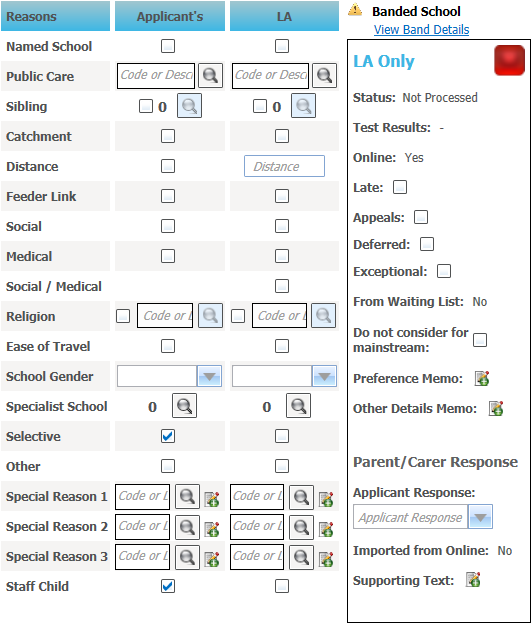
After the Applicant’s reasons have been verified by the Local Authority they must be copied to the LA reasons column via the Copy Applicant Reasons hyperlink on the Applications | Application Details page. Local Authorities can also enter their own additional reasons in the LA reasons column.
The offer process uses the information in the LA reasons column and any additional information in the LA Only panel to rank the students, based on the priority order of the oversubscription criteria.
The following oversubscription criteria can be selected and prioritised via Process | Transfer Groups | Sub Groups | View Details.
Catchment
Catchment can be selected as an applicant’s preference reason. It is automatically selected as an LA reason if Use GIS is selected for the transfer group and the student’s address is within the catchment of the receiver base. This applies to both GIS and postcode catchments.
Distance
Distance from Home can be selected as an applicant’s preference reason. The distance from the student’s correspondence or admission address to the receiver is then displayed in the Applications | Application Details | View Reasons | LA Preference Reasons column. Distances are calculated via Process | Transfer Groups | Students | Pre-Offer Processing, or for an individual application by clicking the Applications | Application Details | Calculate Catchments and Distances hyperlink.
The A&T processes can be run based on either correspondence address or admission address for each transfer group. This is specified by selecting the Use Admission Address check box on Process | Transfer Groups | Details. School places are allocated in ascending order of distance.
In most cases the admission address is the same as the current correspondence address, however there are some exceptions to this, such as returning service personnel or Crown Servants who are applying for a school place because of a confirmed future posting.
Feeder Link
After the Feeder Receiver process has been run (via Process | Transfer Groups | Students | Pre-Offer Processing), if a student’s registered base is linked to the preferred receiver, then the Feeder Link check box in the Application Details | LA Preference Reasons panel is selected automatically. This can be edited.
Late Application
The treatment of late applications varies from authority to authority; some treat them as on time if they are late for a good reason (but are received before a specified date), but others exclude them from the process altogether. If Late is an oversubscription criterion, then students whose applications were received on time are ranked higher than those whose applications were late.
- Enable Late Applications Online: No
The Late Application check box on the Application Details | View Reasons | LA Only panel should be selected if an application was submitted after the closing date for the transfer group or sub group. - Enable Late Applications Online: Yes
The Late Application check box on the Application Details | View Reasons | LA Only panel is selected by default if an application was submitted during the late application submission period for the transfer group or sub group.
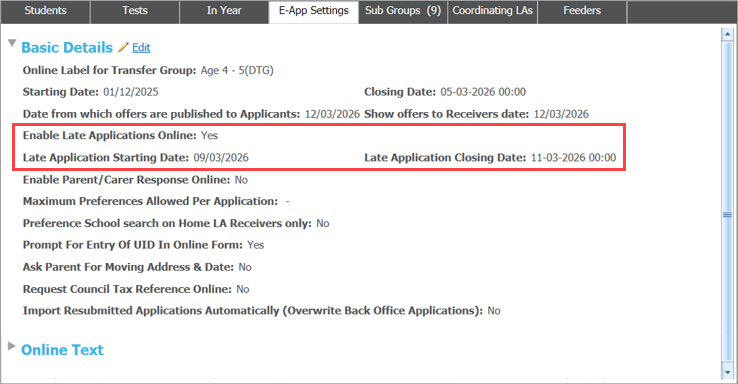
These students are then included in a Late ADT file. When Make Offers is run, there is the opportunity to choose whether or not to include any late applications.
Medical Reasons
Applicants can indicate that they wish to apply to a school on medical grounds. Local Authorities might request supporting information from the applicants who select this.
Named School
If an applicant has claimed that their child has a statement of special educational needs and this is the school named on their statement, this criterion is applied automatically.
Preference
This criterion takes into account the preference rank number chosen by an applicant. Preference ranks greater than 20 or the Process Start Number defined in Process | Transfer Group are Local Authority-generated preference ranks.
Public Care
This indicates that an applicant has stated that the student is in public care. The applicant must also select the name of the Care Authority. This is imported with the preference and can be edited.
Pupil Premium
If the student attracts the Pupil Premium, this criterion can be used when considering the allocation of places. This must be verified by the Local Authority.
Religion
This criterion (the parental reason Faith School) can be selected by applicants to indicate that they are applying to a faith school on religious grounds. Use the lookup table to select the faith of the school.
Siblings
The Siblings criterion enables an applicant to indicate that the student has a sibling currently attending the receiver school or a linked or partner receiver. Partner schools are those that are linked for admissions purposes, e.g. an applicant is applying to a girls’ school, for a girl whose older brother attends a partner boys’ school. The details of the sibling and, if they attend a partner school, the school number, are entered by the applicant.
Social Reasons
Applicants can indicate that they wish to apply to a school for Social Reasons. Local Authorities might request supporting information from applicants who select this.
Special Reasons
Local Authorities can define up to three Special Reasons and assign them a position in the priority order of the selection criteria. Each special reason is made up of a group of codes with allocated weightings, and these are used during the allocation process to rank the students.
- Special reasons are defined and weighted according to points assigned on the Administration | Applications | Special Reasons tab.
- Special reasons and their groups of codes are added to sub groups on the Process | Transfer Groups | Sub Groups tab.
Weighting Codes
A group of codes with assigned weightings can be chosen within each special reason. Student ranking is carried out according to the special reason, then by the weighting of the codes within the reason, with a weight of 1 being the highest priority.
Staff Child
If an applicant has indicated that the child is a child of a member of staff working at the preference school, this criterion can be used when considering the allocation of places. This must be verified by the Local Authority.
Test Mark
Test results (the parental reason Entrance Test) can be used as a selection criterion by Admission Authorities with selective schools, and by those using ability or fair banding. Tests are defined via v4 Client | Tools | Administration | Lookups | Table ID 0421 and are associated with transfer groups and the results imported and processed on the Process | Transfer Groups | Tests tab.
Several additional preference reasons are available to applicants, but cannot be chosen as oversubscription criteria.
School Specialisms
If an applicant thinks their child has an aptitude for their chosen school’s specialisms, they can select this check box, then select the applicable specialisms. Local Authorities might request supporting information from the applicants who select this.
Applicants who select this reason can also choose whether or not they want their child to be automatically considered for the mainstream if they are not offered a place in the specialist stream (the specialist stream can be up to 10% of the total number of places available).
Single Sex or Co-Educational School
If an applicant prefers this school either because it is single sex or because it is co-educational, they can select the appropriate choice from the drop-down. If they choose a single sex school, the Local Authority need to confirm that the gender of the school and the gender of the child match.
Easy to Make Travel Arrangements
An applicant can select this preference reason if they have chosen the school because it is easy for their child to get there.