
Click the back button to return to the previous page or use the Table of Contents.
Free School Meals
The Grants and Benefits module stores Free School MealsFree School Meals (FSM) data in the database. This data is updated automatically by the FSM History scheduled task.
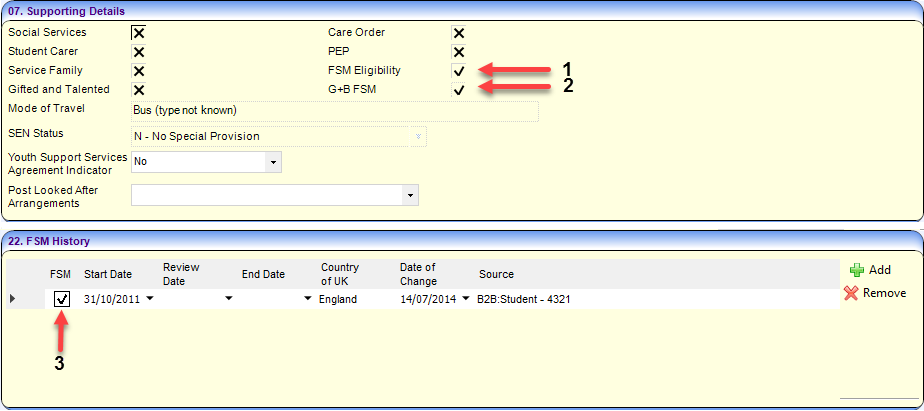
The following graphic highlights the G&B FSM related fields in the Student Details page of the v4 Client (accessed via Focus | People | Students | Student Enquiry) and briefly describes how they are set.
| Number | Description |
| 1 | Calculated automatically when the student record is opened, based on the data within the FSM History panel. You can also toggle the value directly. If you do so, then a new line is added in the FSM History panel. This flag is not stored in the database. |
| 2 | If there is an FSM claim in G&B that is both authorised and current, then the FSMEAL field in the database is set to true and a tick is displayed here. If there is no valid and authorised FSM claim in G&B, then the FSM History panel is checked instead. If the current row of the FSM History panel has a tick, the FSMeal field in the database is set to true and a tick is displayed here. If neither of the above applies, then the FSMeal field in the database is set to false and a cross is displayed here. |
| 3 | Any changes you make here will affect the FSM Eligibility value in the Supporting Details panel next time you open the Student record and will affect the G&B FSM value the next time the FSM scheduled task runs. |
Where is FSM data stored in the database?
- EDUCATION_DETAILS.FSMEALEDUCATION_DETAILS.FSMEAL
The FSMEAL field in the EDUCATION_DETAILS table is included in the STUDENT view. It enables easy reporting on various attributes of a student. It is a flag which can be true (T), false (F) or null (empty).
This field is only updated by the FSM History scheduled task. It is an aggregation of the data held in both the CLAIMS table and the CPD_FSM_HIST table.
The FSMEAL field value is displayed in the G&B FSM check box on the Supporting Details panel of the Student Details page in the v4 Client. If the FSMEAL value is T, it is displayed as a tick. If it is F or null, then it is displayed as a cross.
The FSM_END field in the EDUCATION_DETAILS table is also maintained, which represents the currently expected end date of this FSM eligibility period, if known. This field is also updated by the FSM History scheduled task.
- CPD_FSM_HIST.CPD_FSMCPD_FSM_HIST.CPD_FSM
The CPD_FSM field contains the true (T) or false (F) flag for a given row from FSM History panel of the Student Details page in the v4 Client. For a specified child, the FSM Eligibility flag is set by the CPD_FSM field in the FSM History row of the CPD_FSM_HIST table that covers the current date.
For English LAs, FSM History records include a start and end date. The end date can be blank until a record with a later start date is added for the student or an end date is determined.
For non-English LA's, FSM History records include a date of change only.
This field/table can be updated manually via the Student Details page and by importing data from B2B or other sources.
The CPD_FSM field value, T or F, is displayed in two places in the v4 Client Student page; the FSM History Panel check box and the FSM Eligibility check box of the Supporting Details panel. If the CPD_FSM value is T, it is displayed as a tick. If it is F or null, it is displayed as a cross.
- CLAIMSCLAIMS
The CLAIMS table contains applications made via the G&B module. Not all of these applications will be for FSM claims, an alternative example could be a school uniform grant application.
FSM History Scheduled Task
For all customers, the FSM History scheduled task updates the FSMEAL field on the STUDENT view in the database.
For customers with a G&B v3 or G&B v4 licence, FSMEAL is visible in the v4 Client as the G&B FSM value displayed on the Student Summary panel of the Student Details page. For customers without a G&B v3 or G&B v4 licence, the G&B FSM value/label is not displayed (as the value will match the FSM Eligibility flag after the scheduled task has been run).
The FSM History scheduled task updates slightly different information depending on whether you have a G&B licence.
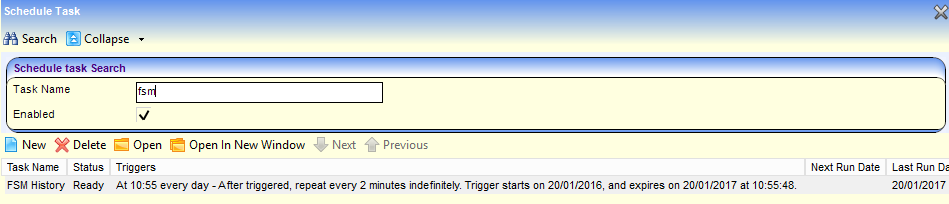
The scheduled task can be set up in the v4 Client via Tools | Administration | Scheduled Task. FSM History can be added to a scheduled task via the Actions panel. This task should run once a day outside of office hours and generally after B2B:Student imports (if FSM data is set to import for your LA).
- Business RulesBusiness Rules
The task updates the G&B FSM flag based on the following business rules:
- Checks if the student is active (based on the ACTIVE field in the STUDENT view).
If the student is not active, then their record will not be updated. If it is active then the task continues. - Checks for an FSM claim in G&B which is both authorised and current. If a particular claim meets these criteria, the FSMEAL field (G&B FSM flag) is set to True (a tick) and the FSM_END field is set to the claim end date.
If the G&B FSM flag was set to a tick on the previous line, the task stops here for that student. If the flag was not set to a tick, the task continues. - Checks for an FSM History record that covers the current date and has a tick/true flag against it. If a FSM History record meets these criteria, then the FSMEAL field (G&B FSM flag) is set to true (tick) and the FSM_END field is set to:
- English LAs - the FSM History row End Date
- Non-English LAs - NULL (empty).
- As none of the above conditions (other than the student being active) have been met, then the FSMEAL field (G&B FSM flag) is set to False (a cross) and the FSM_END field is set to NULL (empty).
The difference between English and Non-English LA's occurs because English LAs record specific start and end dates for FSM records, while Non-English LAs only record a date of change (and so the end date is not generally known until a later date).
- Checks if the student is active (based on the ACTIVE field in the STUDENT view).