
Case Transfer Permissions
To use Youth Justice Case Transfer there are a number of permissions to be applied in the System Admin module | Security Groups located in IYSS System Administration.
YJ permissions in Sysadmin Tools below.
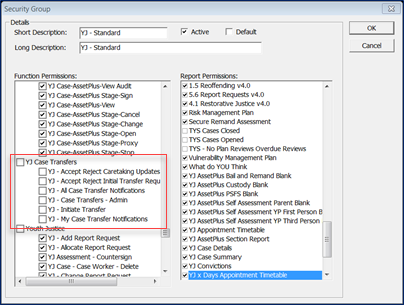
Case transfer permissions are described below.
| Permission |
With |
Without |
| My Case Transfer Tasks Notifications |
Users with this permission will be able to see and use the new My Case Transfer Tasks panel in the top right-hand corner of the Homepage. |
Users without this permission will not see the My Case Transfer Tasks panel. |
| All Case Transfer Tasks Notifications |
Users with this permission will be able to see and use the new Case Transfer Tasks panel in the top right-hand corner of the Homepage. |
Users without this permission will not see the Case Transfer Tasks panel. |
| Accept-Reject Initial Transfer Requests |
Users with this permission will be able to see and use the Accept and Reject buttons within the summary screens of an Initial Case Transfer Request that has been received from another YOT’s system (regardless of whether this request is for a Full or a Caretaking transfer). |
Users without this permission will not see the Accept or Reject buttons within an Initial Transfer Request. |
| Accept-Reject Caretaking Updates |
The Accept and Reject buttons within the summary screens of a Stage Update received from another YOT’s system (where there is a Caretaking arrangement already established). The Send Stage Update menu item within the AssetPlus Stage summary screen left hand menu. The End Transfer button on the AssetPlus panel header within the client case view. |
The Accept or Reject buttons within the summary screens of a Stage Update received from another YOT’s system The Send Stage Update menu item within the AssetPlus Stage summary screen left hand menu The End Transfer button on the AssetPlus panel header within the client case view. |
| Initiate Transfer |
Users with this permission will be able to see and use the Initiate Transfer button on the AssetPlus panel header within the client case view. |
Users without this permission will never see the Initiate Transfer button. |
| Case Transfers - Admin |
This permission is no longer required. This will be removed in a future release. |