
Postcode Catchment Areas
This tab page is used to definedefine postcode catchment areas for receiver bases.
These areas are used when running the Catchment Processes. Catchment areas need only be defined if the Pre-Offer Processing routine is to be run using this method.
Use the Base search to locate and select a base. The Base Details are displayed in the right hand panel. Any postcode areas that are already in the selected base’s catchment are listed when you select the Catchment tab. The number of postcode areas included is shown at the top of the tab.
- Select a base.
- Select the Catchment tab to view a list of the base's existing postcode catchment areas.
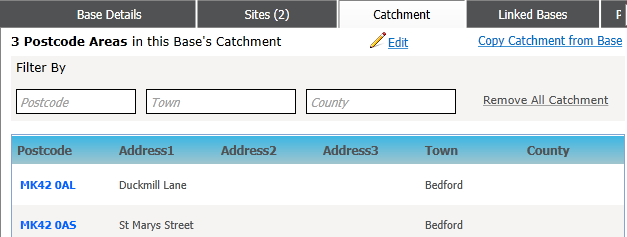
- Choose from the following options:
- Click the Edit hyperlink to view an editable list of all available catchment areas.
Existing catchments are displayed at the top of the list, separated by a brown line.
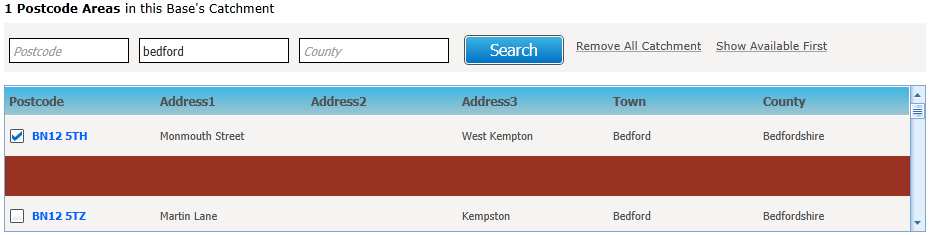
- Click Search to filter the list by Postcode, Town and/or County.
- Click Remove All Catchment to clear the list.
- Click Show Available First to show postcodes available for selection at the top of the list.
- Click Show In-Catchment First to show postcodes in the already in the Catchment at the top of the list.
- Select or de-select the check boxes as required.
- Click the Copy Catchment from Base hyperlink to display the Choose Base To Copy Catchment From dialog.
- Search for and select a base to copy from. A confirmation message is displayed.
- Click the Continue button to copy the base's postcode catchments to the original base.
- Click Remove All Catchment to clear the list of postcodes.
- Click the Edit hyperlink to view an editable list of all available catchment areas.