
A&T – Allow schools to create and assign categories to applications (3.89)
Description
A new Configure Category tile has been added to the School Admission Portal (SAP) dashboard.
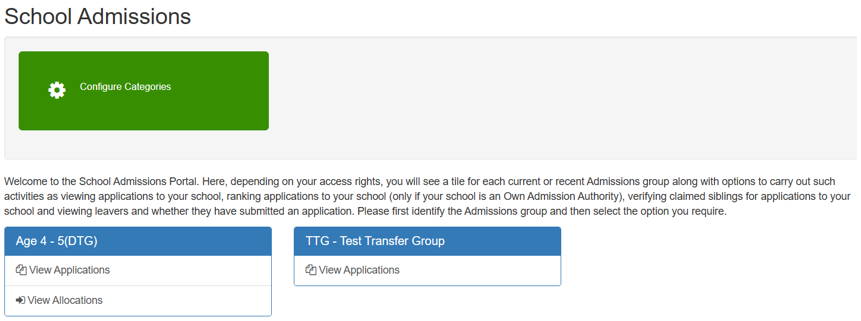
Click image to enlarge. Use browser back button to return.
This feature allows school administrators to define, edit, and manage custom admission categories (e.g., OS1, OS2) using free-text labels. These categories then display as a new column on the applications and allocation pages. It allows users to assign a child to a specific category (one-to-one mapping).
Category Configuration
- Add/Edit Category
Supports special characters such as &, -, (), #
Click image to enlarge. Use browser back button to return.
- Edit/Delete Category
Allows school administrators to maintain and update their admission categories as requirements change. This ensures that the list of categories (e.g., statutory O/S rules) remains accurate and relevant for the current admissions cycle and the subsequent appeals process.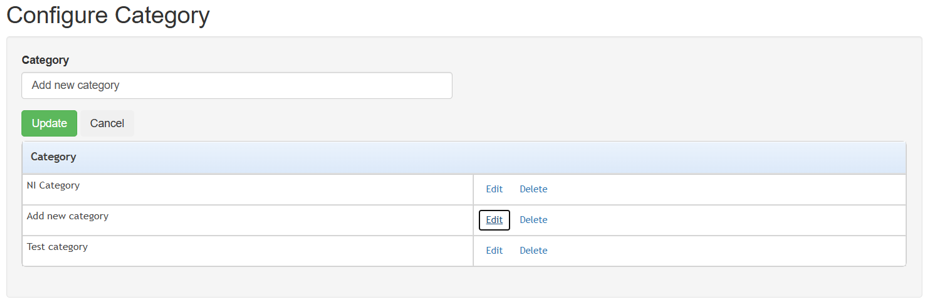
Click image to enlarge. Use browser back button to return.
Categories are provider-specific. Users cannot view or access categories defined for other providers.
A live character counter has been added to the Category Name field. This feature provides real-time feedback as users type. It ensures that category names do not exceed the 55-character limit. The counter updates dynamically as characters are added or deleted and resets to zero if the field is cleared.
The category list on the Category Configuration page has automatic sorting. Categories are organised numerically first, followed by alphabetical order (A–Z).
View Application page
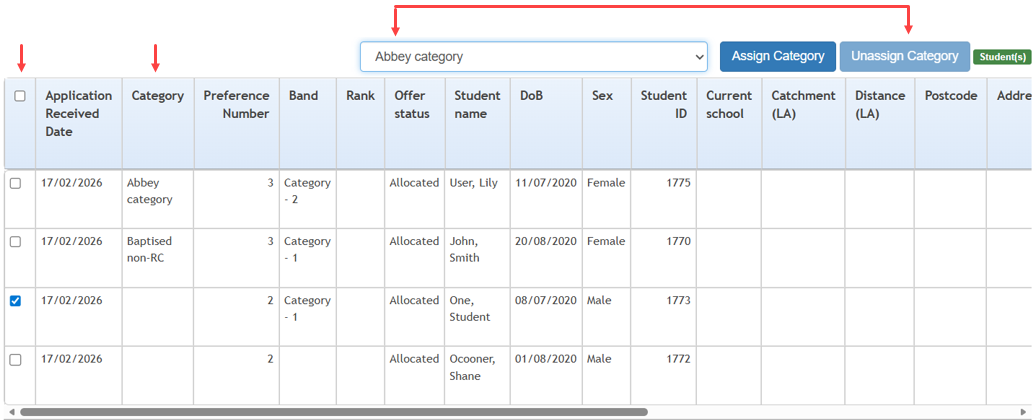
Click image to enlarge. Use browser back button to return.
- An Assign Category button has been added to the View Application page.
The button is positioned at the top-right corner of the application table. This button enables users to assign specific, pre-configured categories to child applications. - An Unassign Category button has been added to the View Application page.
This functionality allows users to remove previously assigned categories from student applications. It provides school administrators and admission officers with the ability to correct or update category assignments. This ensures data accuracy within the portal and the Admissions and Transfers Back Office (ATBO). This is critical for the statutory admissions process and subsequent appeals. - A checkbox column has been integrated into the application table.
This column is positioned on the far left of the grid and includes a select all checkbox in the header row. The addition of checkboxes allows users to easily select multiple applications simultaneously, facilitating bulk actions such as assigning categories to several students at once. - Category has been added to the following:
- Show/Hide Column Settings
Users can now toggle the visibility of the Category column within the application table. - Sort Order Settings
Category is now an available option in the sort dropdown. It allows users to organise applications by their assigned categories.
- Show/Hide Column Settings
- Category has been added to filtering.

Click image to enlarge. Use browser back button to return.
It enables school administrators and admission officers to efficiently manage large volumes of applications by grouping them according to specific admission criteria (e.g., Welsh statutory O/S rules).
- A new Category dropdown filter is located in the first line of the filter section.
- It has multi-select capability.
This allows users to filter by one or more categories simultaneously. - A search function within the dropdown is available to quickly find specific categories in long lists.
- There are visual indicators showing which category filters are currently active.
- A Clear function is available to reset the category filter and return to the full application list.
MRI Education Client (MEC)
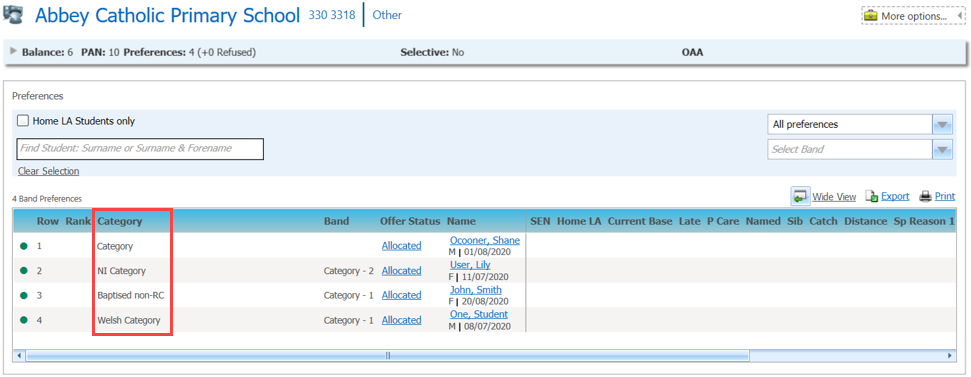
A new Category column has been added to the Application Details page within the MRI Education Client (MEC) portal. This change supports the appeals process and provides Local Authority (LA) users with better visibility into how applications are classified. By displaying these categories, LA users can clearly understand the basis for admission decisions. They can then maintain a record of how many children were offered places within each specific category.
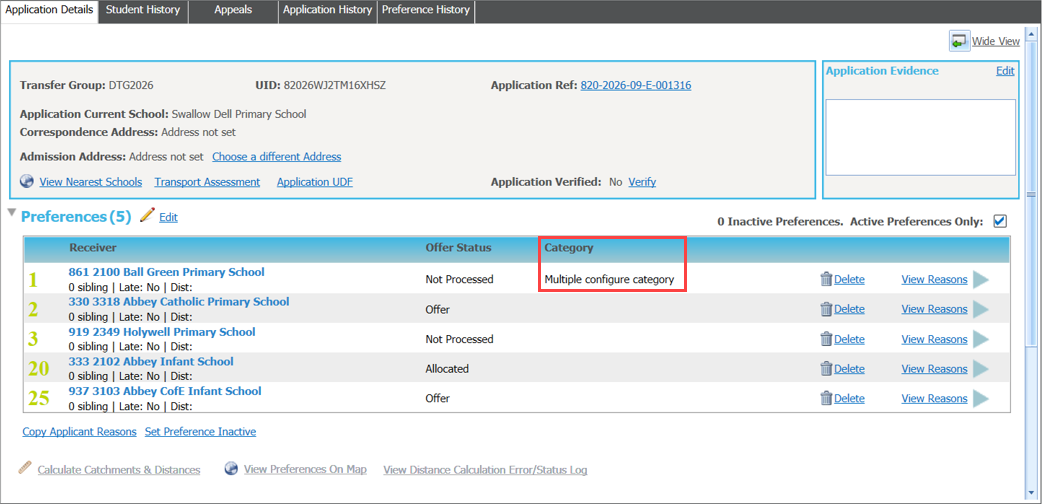
Click image to enlarge. Use browser back button to return.
The Bases Receivers page in the MRI Education portal has been updated to include a new Category column. This column is positioned immediately after the Rank column and displays the admission categories assigned to student applications by schools or providers. This eliminates the need to cross-reference other systems or contact schools for classification details. The view-only nature of the column ensures data integrity, as only the original school/provider can modify the category assignments. If no category has been assigned to an application, the field remains blank.
Click image to enlarge. Use browser back button to return.
Helpfiles updated
Access the School Admissions Portal
The Portal Landing Page
View Applications